VIRTUAL BOY HOMEBREW DOCUMENT PART III.
Note: This page is under construction.
Using Part of a picture.
So how do people do sprites? The same way they do screens. Except they put all the sprites in a single .bmp and then tell the world to just use part of an image. So let's say you have a bunch of "sprites" like so:

The biggest you can make your sprite sheet is 512x512 pixels.
In this example, each "sprite" is 40x40 pixels. So let's say you wanted to use the bottom half of "sprite" 2. You would do this:
vbSetWorld(31, WRLD_ON, screenposx, 0, screenposy, 40, 0, 20, 39, 19);
= The 40 represents the x position of where you want to begin "cutting" the sprite.
= The 20 represents the y position of where you want to begin "cutting" the sprite.
= The 39 represents how much of the place you cut's width (in pixels)
= The 19 represents how much of the place you cut's height (in pixels)
You saved me!
So let's say you want to make a game so long you need saving points. Good luck with that, you'll need it! But you CAN do it on the Virtual Boy. Inside every VB game that can save your data, there is a little round battery that stores all the data the developers wanted to be able to save. If you want to make an actual VB cartridge that uses a battery, be sure to tell the maker that your game has a battery. You can test your save function on a HyperFlash32. Also, Mednafen also stores your save information, albeit on the computer, so you can use that as well.
How to do it.
Here is some code.
You need to put this in your C file before all else, but after the #includes.
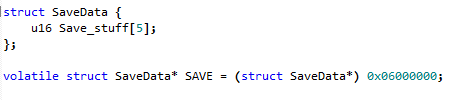
This is just if you want to save three values. You can save more than just one value, though. But it starts with 0. So you need two save values to save one value for some reason.
Total recall.
So let's say you want to save the level you're on. First, replace "u16 Save_stuff[5]" with "u16 level[1];".
To read variables, you put this in C:
level = SAVE->Save_stuff[0];
Yes, just like that, the little arrow thingy in ASCII. To write to the save function, you'd do the opposite:
SAVE->Save_stuff[0]=level;
So then you could use the level in a switch statement or something.
and so on. In an upcoming document (yes, there will be a part IV!) I'll tell you how to rotate and zoom screens and print text. Wow.